Loading game…
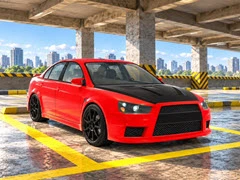
Parking Shift: Car Simulator
Game guide
About Parking Shift: Car Simulator
Parking Shift: Car Simulator is a free 3D Games game that you can play at WillingGames.com. It has been played 1 times.
Parking Shift: Car Simulator puts your steering precision and spatial awareness to the ultimate test in a feature-rich browser driving experience built for precision enthusiasts. Across 41 distinct parking challenges, players must navigate tight spaces, bypass complex obstacles, and position their entire vehicle accurately inside a glowing marked bay before the countdown timer hits zero. Whether you choose the nimble handling of a high-performance sport sedan or the robust durability of a rugged 4x4, mastering every tricky angle requires patience, steady nerves, and quick reflexes.
Survival on the course depends on your driving discipline. The game utilizes a strict three-heart health system where every single collision drains one heart, penalizing careless steering immediately. Both forward and reverse parking maneuvers are required to clear later stages, meaning you cannot rely on a single technique. Fortunately, helpful features such as an optional parking helper and customizable camera angles allow you to tailor the viewpoint to your comfort level. You can even drag an empty area on your screen or use the mouse to look around freely and spot hidden obstacles before moving.
Beyond the intense driving stages, Parking Shift: Car Simulator offers an engaging garage system to personalize your ride. Between challenges, you can modify paint colors, neon underglow lighting, wheel designs, and various body parts, or spend resources on performance upgrades. Your progress, custom vehicle configurations, and settings are saved automatically so you can pick up right where you left off. Dive into the driver's seat today and prove your mastery over every intricate parking layout.
If you like this game and want to play similar cool free games, just go to the 3D Games, Car Games category(/categories).
Parking Shift: Car Simulator puts your steering precision and spatial awareness to the ultimate test in a feature-rich browser driving experience built for precision enthusiasts. Across 41 distinct parking challenges, players must navigate tight spaces, bypass complex obstacles, and position their entire vehicle accurately inside a glowing marked bay before the countdown timer hits zero. Whether you choose the nimble handling of a high-performance sport sedan or the robust durability of a rugged 4x4, mastering every tricky angle requires patience, steady nerves, and quick reflexes.
Survival on the course depends on your driving discipline. The game utilizes a strict three-heart health system where every single collision drains one heart, penalizing careless steering immediately. Both forward and reverse parking maneuvers are required to clear later stages, meaning you cannot rely on a single technique. Fortunately, helpful features such as an optional parking helper and customizable camera angles allow you to tailor the viewpoint to your comfort level. You can even drag an empty area on your screen or use the mouse to look around freely and spot hidden obstacles before moving.
Beyond the intense driving stages, Parking Shift: Car Simulator offers an engaging garage system to personalize your ride. Between challenges, you can modify paint colors, neon underglow lighting, wheel designs, and various body parts, or spend resources on performance upgrades. Your progress, custom vehicle configurations, and settings are saved automatically so you can pick up right where you left off. Dive into the driver's seat today and prove your mastery over every intricate parking layout.
If you like this game and want to play similar cool free games, just go to the 3D Games, Car Games category(/categories).
How to play
Desktop Controls:
- W / Up Arrow: Accelerate forward
- S / Down Arrow: Brake or shift into reverse
- A / D or Left / Right Arrow: Steer left and right
- Space: Engage handbrake
- R: Toggle reverse gear manually
- C: Switch camera perspective
- Mouse Drag: Look around freely
- H: Toggle parking helper guidance
- Esc: Open pause menu
- M: Mute audio
- Lower-Center Joystick: Click and drag to steer using mouse controls
- On-Screen Pedals & Steering: Use touch inputs to accelerate, brake, and steer
- Free Finger Drag: Swipe across empty screen areas to inspect your surroundings
Frequently asked questions
Parking Shift: Car Simulator FAQ
Q: How many unique levels are available to complete in Parking Shift: Car Simulator?A: The game features 41 distinct parking challenges, each carefully designed to test your precision driving, obstacle navigation, and spatial awareness under tight time limits.
Q: What kind of vehicles can I drive and customize in the garage?
A: You can choose between a nimble sport sedan and a rugged 4x4. In the garage, you can personalize them with custom paint jobs, neon lighting, new wheels, body parts, and performance upgrades.
Q: How does the health system work during a parking run?
A: You start each stage with three hearts. Every time your car collides with an obstacle or boundary, you lose one heart, and the run ends immediately if all hearts are depleted or the timer expires.
Q: Are there any tools available to make tight parking spots easier?
A: Yes, you can toggle a built-in parking helper to assist with positioning, change camera angles for a better view, and drag the screen with your mouse or finger to look around freely.
No comments yet. Be the first to share your thoughts.